
.avif)
A polished Figma prototype can create confidence that the HMI is moving in the right direction. But in embedded development, UX approval is often where a different kind of complexity begins.
Layouts must become production logic. Interactions must hold up on target hardware. Design intent has to survive engineering handoffs, platform constraints, testing, and future changes. When those stages are disconnected, already-approved work can quickly turn into recreation, reinterpretation, and repeated validation.
That is where seemingly small workflow gaps begin to affect engineering effort, delivery schedules, and the overall cost of embedded HMI development.
The real question is not how quickly a design leaves Figma. It is how much of that completed work can keep moving forward as the HMI gets closer to production.
What happens between Figma approval and target deployment is where HMI programs either preserve momentum—or pay for the same work twice.
Why the Design-to-Embedded Gap Becomes Expensive So Quickly
A design handoff is rarely limited to exporting assets. In a fragmented HMI development workflow, engineers may need to reconstruct layouts, rebuild behaviors, verify visual details, and optimize the result for an embedded processor, GPU, memory budget, OS, or RTOS.
Each translation creates another chance for approved UX and implemented HMI to diverge. If hardware limitations surface late, teams may also need to revise interactions or visual treatments after sign-off.
The program therefore pays for implementation, clarification, correction, and retesting. In embedded GUI development, the stronger workflow keeps approved design work usable for longer.
Turn Approved Figma Designs Into Embedded Work Without Starting Over
An HMI can look finished in Figma and still be far from production.
The expensive part often begins after UX approval, when engineering teams must translate layouts, behaviors, assets, and interactions into an embedded environment. If that process depends heavily on manual recreation, approved work can quickly turn into additional engineering effort, design deviation, and retesting.
For buyers evaluating embedded HMI development software, the more important question is not simply whether Figma content can be imported. It is how much approved design work can continue into implementation without being rebuilt.
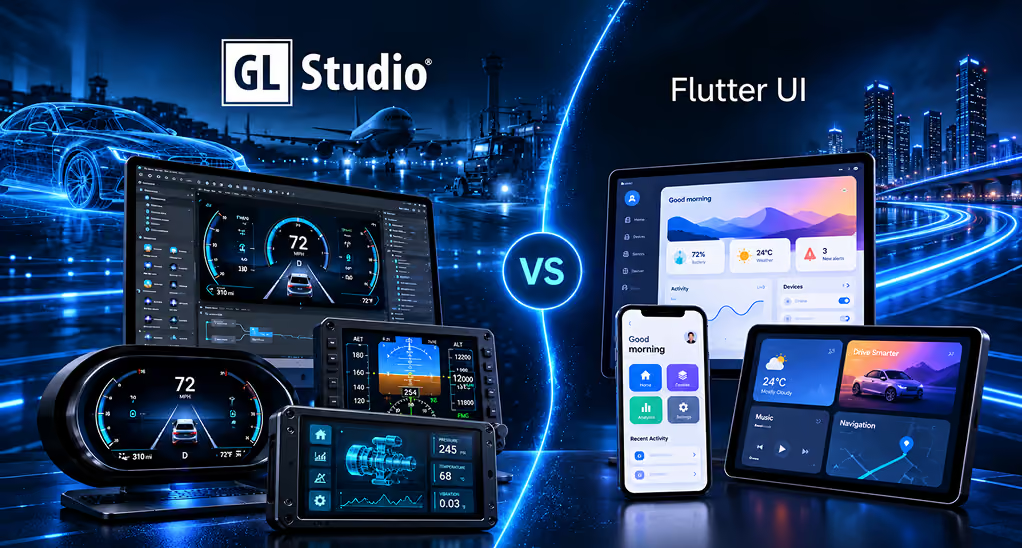
GL Studio® is designed to support that continuity. Its Figma importer can bring Figma content, including dynamic layout behavior, into GL Studio®, while the broader workflow supports native C++ generation, testing, and embedded deployment.
The Figma importer is therefore not the business case by itself. The stronger value is that more of the UX investment already approved and funded can remain useful as the HMI moves into production development.
Once that design foundation is preserved, the next consideration is how efficiently teams can test, refine, and approve the changes that follow.
How Design Handoffs Increase Embedded HMI Development Costs
A design handoff can look simple: UX signs off, engineering takes over.
In practice, layouts may be recreated, behaviors translated, assets adapted, and the implementation checked against processor, GPU, memory, display, OS, or RTOS constraints. Validation then has to confirm that the result still matches the approved experience.
A mismatch found early may take minutes to fix. Found after implementation and target testing, it can trigger work across several teams.
That is how translation becomes a production cost. The goal: keep approved work usable for as long as possible.
Turn Approved Figma Designs Into Embedded Work Without Starting Over
An approved Figma design should move the HMI program forward—not become the starting point for another round of recreation.
GL Studio® helps teams bring Figma content into the embedded HMI development environment while retaining more of the original design structure and behavior. This gives engineering a stronger starting point for implementation instead of treating the approved UX as a visual reference that must be rebuilt.
For HMI teams and program leaders, that can translate into:
- Lower implementation effort: Reduce the amount of approved interface work that engineering needs to recreate manually.
- Better design fidelity: Preserve more of the approved UX as the HMI moves from design into development.
- More productive engineering time: Keep specialists focused on application logic, system integration, target constraints, and validation.
- Faster progress after design approval: Shorten the distance between UX sign-off and meaningful embedded development work.
The commercial value is not simply that Figma content can move into GL Studio®. It is that more of the design investment already approved and funded can continue into production development without being recreated.
Once that foundation is preserved, the next question becomes just as important: how quickly can teams test, refine, and approve the changes that inevitably follow?
Make Every Design Iteration Cheaper to Test, Refine, and Approve
No production HMI reaches the target unchanged. Stakeholders request revisions, usability testing exposes new requirements, and target hardware introduces practical constraints.
The cost question is not whether teams will iterate. It is how expensive each iteration becomes.
GL Studio allows teams to preview and test changes and use OneTouch Deployment to evaluate revisions on target hardware. DiSTI specifically positions rapid iteration on the target as part of the GL Studio development workflow.
That matters because feedback is cheapest when it happens close to the change that created it.
A visual issue found during early review is a design adjustment. Discovered after integration and testing, it becomes an engineering task.
The stronger loop is:
Change → preview → target check → refine
not:
Change → handoff → rebuild → integrate → test → return
Faster iteration reduces more than development time. It limits the chance that a small correction becomes expensive downstream rework.
Remove the Handoffs That Turn Small HMI Changes Into Large Engineering Tasks
Handoffs become expensive when UX, engineering, embedded development, and validation teams are working from different versions of the same HMI.
A small change to a shared control, state, layout, or animation can then trigger multiple rounds of recreation, interpretation, retesting, and approval. The issue is not the size of the change itself. It is the number of teams and development stages that have to touch it again.
GL Studio® supports a more connected HMI development workflow by bringing visual development, reusable assets and behaviors, native C++ generation, preview, deployment, external asset linkage, and third-party integration into the same broader development process.
For buyers evaluating embedded HMI development software, this becomes an engineering-utilization question: how much specialist time is spent advancing the HMI, and how much is spent reproducing work already completed elsewhere?
Reducing those handoffs helps keep more engineering effort focused on the work that moves the program forward. That becomes even more valuable when the same HMI must later support additional hardware, displays, or product variants.
Build the HMI Once Without Letting Every Target Become a New Development Project
An HMI rarely stays tied to one configuration. Product lines expand, display variants change, new hardware platforms are introduced, and operating-system requirements evolve. When the HMI is tightly coupled to a single target, every variation can bring previously completed engineering work back into scope.
GL Studio® addresses this through native C++ generation, cross-platform deployment, and reusable UI assets that help teams carry more of their completed HMI development forward.
For OEMs and Tier 1 suppliers, this can create several business advantages:
- Lower engineering effort across variants: Reuse more application work instead of rebuilding the HMI foundation for each new target.
- More scalable product expansion: Support additional displays, platforms, or product configurations without allowing HMI development effort to grow at the same rate.
- Better return on existing HMI investment: Preserve more of the design and engineering work already funded as programs expand.
- Greater flexibility in future platform decisions: Keep hardware and operating-system choices from being unnecessarily constrained by earlier HMI development decisions.
Target-specific integration and validation will still be required. The commercial difference is how much completed work has to be repeated before the next target can move forward.
For buyers evaluating embedded HMI development software, that makes cross-platform capability more than a technical requirement. It becomes a question of how effectively the platform can protect development investment across the product lifecycle.
And that becomes even more important when a new target is not planned product expansion, but a required hardware or platform change.
Stop Hardware Changes From Forcing HMI Teams Back to the Drawing Board
A processor reaches end of life. A board changes. An OS or RTOS is replaced. The UX may still be valid, yet a tightly coupled implementation can force the HMI team backward. This is where portability becomes a lifecycle cost issue.
GL Studio’s native C++ approach and cross-platform architecture are designed to preserve more application work as deployment environments evolve. DiSTI’s supported-platform model spans desktop and embedded configurations.
The value is not “hardware flexibility” as a feature claim. It is the ability to make a hardware decision without automatically creating another full HMI implementation project.
That protects existing engineering investment and reduces migration exposure as the program evolves.
Compress the Journey From UX Approval to Target Validation
Time-to-market often slips between UX approval and the first reliable target build. Designs move into engineering, integration follows, target-specific issues surface, and changes travel back through the workflow. Individually, these loops may seem small. Across a production HMI program, they add engineering effort and schedule exposure.
GL Studio® shortens this path through desktop development, instant preview and testing, and OneTouch Deployment™, allowing teams to evaluate revisions on the target earlier in the development cycle.
For HMI teams, that can mean:
- Earlier target validation: Identify rendering, interaction, and platform considerations before late-stage integration.
- Fewer corrective development loops: Validate changes closer to the point where they are made instead of reopening completed work later.
- Faster movement after UX approval: Reduce the translation and redevelopment between an approved interface and a working embedded build.
- More predictable production milestones: Give engineering and program leaders earlier visibility into how the HMI performs on the intended target.
For OEMs, Tier 1 suppliers, and engineering leaders evaluating embedded HMI development software, the question is not only how quickly an interface can be designed. It is how efficiently an approved UX can become a validated embedded HMI.
When that path becomes shorter and more predictable, workflow efficiency moves beyond engineering productivity and becomes a time-to-market advantage. And when the same efficiency carries across products, targets, and programs, the commercial impact becomes even greater.
Where This Workflow Creates the Greatest Commercial Advantage
The value is strongest when HMI quality, reuse, and delivery speed affect more than one release.
For OEMs, preserving design and engineering work can support consistent experiences across product variants without repeating implementation effort. For Tier 1 suppliers, a continuous workflow can improve delivery predictability across customer programs and target configurations. For graphics-intensive programs, earlier target evaluation helps determine whether ambitious visuals remain practical on selected hardware. For engineering leaders, less recreation means more capacity for integration, optimization, safety, and differentiated functionality.
The commercial principle is the same:
More of the work already paid for continues creating value.
Evaluate HMI Platforms by How Much Work They Remove From the Process
Feature checklists can make HMI development tools look similar. Workflow economics reveal the larger difference.
Before selecting embedded HMI development software, ask:
- How much approved UX must engineering recreate?
- How many translations occur between design, implementation, validation, and deployment?
- How early can the HMI be evaluated on the real target?
- What happens to completed work when hardware or OS requirements change?
- How much visual content, logic, and reusable behavior carries into the next variant?
These questions turn platform evaluation into a Total Cost of Ownership discussion.
A lower software price can lose its advantage if the workflow demands more engineering hours and rebuilding. The better benchmark is how much completed work the platform allows the program to keep.
Reduce the Rework Between Your Next Figma Design and Embedded Target With DiSTI’s GL Studio
Moving from Figma to embedded deployment should not mean paying to recreate the same HMI at every stage.
GL Studio is designed to keep more of that investment intact:
- Less design recreation → lower implementation effort
- Faster iteration → earlier validation and fewer late corrections
- Fewer handoffs → lower rework and engineering overhead
- Cross-platform flexibility → less redevelopment as targets evolve
- A more continuous design-to-target path → faster movement toward production
If your next HMI begins in Figma and has to perform reliably on embedded hardware, evaluate what happens between those two points—not just the tools at either end.
GL Studio® — Powering Next-Gen HMI Experiences


.avif)